
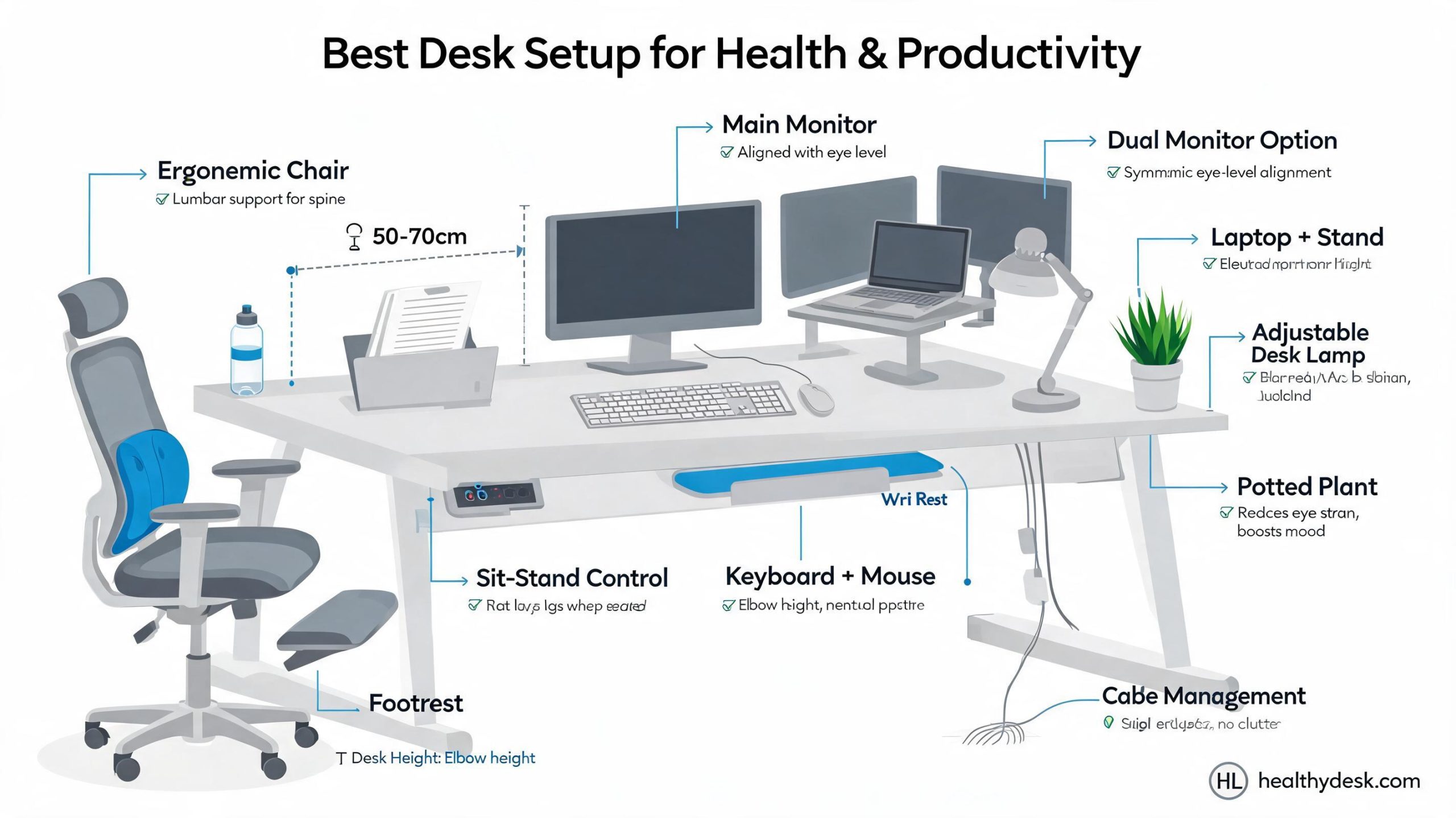
A Chiropractor Guide: Best Desk Setup for People Who Sit All Day
A Chiropractor Guide: If you work a desk job in America, chances are you’ve felt that dull ache between your shoulders or that stubborn lower back stiffness that shows up right around 3 p.m. And trust me—after years of hearing the words “I just sit too much” from patients, I’ve come to see desk setups like modern-day puzzles. Everyone thinks they have all the right pieces… until something starts hurting. Does that sound familiar?
I’m sharing what I’ve learned not just from textbooks and certifications, but from real-world experience, office visits, corporate wellness workshops, and even my own mistakes (including one questionable gaming chair phase I’m still embarrassed to admit).
Let’s break down what actually works for people who sit all day—and why the typical “sit up straight!” advice barely scratches the surface.
The Hidden Problem With Sitting All Day
People often quote the line “sitting is the new smoking,” which got popular after researchers started linking excessive sitting to heart disease, diabetes, and back problems. But here’s the bit most folks miss: it’s not just the sitting—it’s the way people sit.
According to Sedentary Lifestyle studies on Wikipedia, prolonged sitting affects circulation, breathing capacity, and spinal alignment. But in real-life American offices, I’ve noticed a different pattern: people slump not because they’re lazy, but because their workspace practically forces them into awkward positions.
So instead of blaming yourself, let’s fix the environment around you.
Your Desk Setup Should Adjust to You — Not the Other Way Around
Ergonomics isn’t about buying fancy gear; it’s about respecting the geometry of your body. I learned this the hard way years ago when I treated a software engineer who sat on a $1500 chair but leaned forward like he was trying to kiss his monitor all day. Comfort is not the same as alignment.
1. Chair Height: The Forgotten Foundation
Your chair determines everything else. If it’s wrong, you’re basically building a house starting with a crooked foundation. Here’s the rule of thumb I tell patients:
- Feet flat on the floor (or a footrest—yes, grown adults can use these proudly)
- Knees at roughly 90–100 degrees
- Hips slightly above knee level
But there’s something most online guides skip: the seat pan depth. I’ve seen countless people sit on chairs where the seat is too deep, forcing them to slouch because they can’t use the backrest fully. Ideally, you should have about 2–3 fingers of space between the edge of the seat and the back of your knees.
Little detail, huge difference.
2. Back Support That Actually Helps (Not the Fluffy Kind)
Lumbar support shouldn’t feel like a pillow; it should feel like a firm, supportive hand guiding your spine to stay neutral. I once visited a corporate office where employees had placed rolled-up sweaters behind their backs because the chairs “looked cool but felt useless.”
Consider these lumbar basics:
- Your lower back should maintain a slight forward curve
- The support should sit at belt-level—not higher
- It shouldn’t push you forward like an aggressive salesperson
If your chair doesn’t offer it, a simple adjustable lumbar cushion works wonders.
3. Desk Height: The Silent Culprit Behind Shoulder Pain
Here’s a niche detail many chiropractors know but most guides skip: desks in many American offices are standardized at 29–30 inches high because that used to match typing posture from decades ago. But modern keyboard designs and mouse usage demand slightly different ergonomics.
Ideally:
- Your elbows should be at 90 degrees or slightly open
- Your shoulders should not rise toward your ears
- Your forearms should float comfortably—not perched
Is your desk too high? A keyboard tray or a height-adjustable desk solves the issue.
The Monitor Setup Most People Get Wrong
Let me confess something: I used to believe that raising your monitor was the magic solution to neck pain. Then one of my patients—a graphic designer—proved me wrong. She complained of neck strain even though her monitor was “eye-level” like every guide says.
Turns out her monitor was too far away, causing her to lean forward constantly.
Ideal Monitor Distance & Height
- Distance: About an arm’s length away
- Top of the screen: At or slightly below eye level
- Tilt: Slight upward tilt to prevent chin jutting
But here’s the twist: if you wear progressive or bifocal lenses, all of this flips. You’ll want the monitor slightly lower to prevent you from tilting your head backward. It’s one of those niche chiropractic adjustments we make often during workplace assessments.
Keyboard & Mouse: Small Tools, Big Influence
People don’t realize it, but poor wrist posture contributes to everything from elbow pain to shoulder tightness. Yes, the shoulder. The body is one big chain, and tension travels.
Keyboard Advice You Probably Haven’t Heard
Most ergonomic articles talk about keeping wrists neutral, but here’s what I tell my patients:
- Keep the keyboard flat—avoid those rear risers
- Avoid wrist rests while typing; use them only during breaks
- If you tend to “float type,” consider a split keyboard
A simple test I use during appointments: if your wrists naturally angle outward like a “V,” you may benefit from a split keyboard. Makes typing shockingly more comfortable.
The Mouse: Your Shoulder’s Worst Enemy
Quick question: ever feel your shoulder creeping up slowly as you work, like it’s trying to escape? That’s often a mouse problem.
- Keep your mouse close to your body
- Try smaller mice if your hands are small—large ones force your shoulder outward
- Consider a vertical mouse if you struggle with wrist rotation
One accountant I worked with had chronic shoulder pain… until she switched to a compact mouse. Pain dropped by 70% within two weeks.
Lighting, Airflow & Other Underrated Factors
Here’s the truth: the perfect desk setup isn’t just about furniture. Environmental stress matters more than people think.
1. Natural Light Matters
Sitting near a window not only reduces eye strain but improves mood and reduces the “slouch reflex.” You know—when your energy dips and your posture follows. The science behind circadian rhythm explains why daylight impacts alertness so strongly.
2. Temperature Affects Posture
Too cold? You’ll hunch. Too warm? You’ll droop. America’s office thermostats are notorious for turning rooms into mini-tundras—especially in older commercial buildings.
3. Airflow Influences Movement
A quiet fan or air purifier encourages micro-movements. Small, but important. These movements reduce stiffness and stimulate circulation.
Mini Case Studies from Real American Workplaces
Case Study 1: The Startup Developer
A developer working 12-hour days complained of stabbing mid-back pain. His desk was perfect—except his monitor was placed off-center due to a plant he didn’t want to move. That slight twist caused months of discomfort. Adjusting the monitor fixed the issue.
Case Study 2: The Remote Accountant
She worked from her dining table and wondered why her shoulders always burned. The table height was 2 inches too high. A simple keyboard tray changed everything.
Case Study 3: The Customer Support Rep
He sat on a soft, cushy chair. Comfortable? Sure. Supportive? Not remotely. Switching to a firm, ergonomic chair improved his posture almost immediately.
Movement: The Part People Resist the Most
Here’s the unpopular truth: the best desk setup in the world still can’t replace movement. I tell patients to follow the “20-8-2 Rule” — every 30 minutes, sit for 20, stand for 8, and move for 2.
But let me be realistic for a second. In busy American workplaces, some managers give side-eye if you stand too often. So here’s a more subtle approach:
- Set a silent vibration reminder on your phone
- Drink more water (forces natural breaks)
- Use stretch bands under the desk
- Rotate between sitting and perching on a high stool
Small habits → huge results.
The Perfect Desk Setup Checklist (Chiropractor Verified)
Chair Alignment
- Feet flat
- Hips slightly above knees
- Lumbar support at belt line
Desk Positioning
- Elbows 90 degrees
- Desk not too high
- Keyboard tray if needed
Monitor Setup
- Arm’s length away
- Top of screen at eye level
- Adjust for glasses users
Keyboard & Mouse
- Keyboard flat
- Mouse close
- Avoid wrist extension
Environment
- Good natural light
- Comfortable temperature
- Clean airflow
Final Thoughts (But Not the Predictable Kind)
Honestly, the “perfect” desk setup isn’t a single layout—it’s a living, breathing system that adapts to your body and your habits. Some days, even with ideal ergonomics, your posture will slip. Mine does too. And that’s okay.
The real secret isn’t perfection; it’s awareness. Catch the slump early. Adjust your chair. Change your position. Listen to your spine like you’d listen to a friend trying to warn you about something.
And if something still feels off? A chiropractor can assess subtle imbalances your desk setup can’t fix on its own.
Take care of your desk, and your desk will take care of you. Or at least, it’ll stop trying to ruin your back.